Was your data actually written to disk?

When we think of data durability, one thing comes to mind. That data has been safely stored such that an adverse occurrence like power outage or system crash doesn’t lead to data loss.
In this article, I trace the path data takes from the point you call the library function responsible for writing data to files in your programming language of choice, up to the point that piece of data gets written to the physical storage device. For our case we are going to use the C programming language.
While working on TidesDB, I kept asking: if I call write and then fsync on a file descriptor, can I still lose data? To answer that question I dug into how storage works, especially SSDs and the three buffering layers that affect persistence: application/library buffers, the kernel buffer, and the storage device’s volatile cache.
There are 3 layers data gets written to by your application before it finally reaches the storage device.
Application /Library buffer
Operating system page cache
Storage device volatile cache
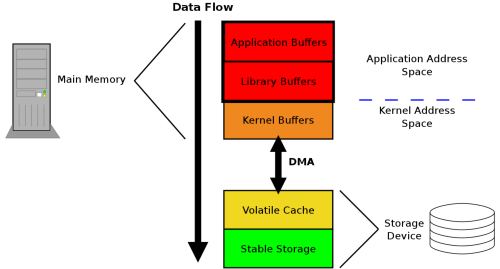
The choice on whether you are going to use the application buffer or write directly to the operating system page cache depends on the C language constructs you use. These are the file descriptor and file pointer.
A file descriptor is a non-negative integer that used at a lower level by the operating system to keep track of open files within the file descriptor table. File descriptor I/O bypasses user-space buffering, only going through the kernel’s page cache.
A file pointer on the other hand is a reference to a file structure, used at a higher level and managed by the application. Function calls made are buffered at the application level without the OS involvement.
Application/Library buffers
This is an address space resident memory that buffers file operations before they get flushed to the operating system. The goal of this buffer is to improve application performance by reducing the number of expensive read/write system calls to the kernel every time we do an operation to the file, for example writing a line of text to a file.
To ensure that data in the application buffer reaches the operating system, an accompanying fflush call has to be made to the underlying buffer, to ensure that it’s contents are flushed. The flushing can also happen automatically when the buffer is full and no more content can be written to it.
1
2
3
4
5
6
7
8
9
10
11
12
13
14
15
16
17
18
19
20
21
22
23
24
25
26
27
28
29
30
31
32
33
34
35
36
#include <stdio.h>
#include <stdlib.h>
#include <string.h>
#include <errno.h>
#include <unistd.h>

#define BUF_SIZE 4096

int
sock_read(int sockfd, FILE *outfp, size_t nrbytes)
{
      int ret;
      size_t written = 0;
      char *buf = malloc(BUF_SIZE);

      if (!buf) return -1;

      while (written < nrbytes) {
              ret = read(sockfd, buf, BUF_SIZE);
              if (ret <= 0) {
                      if (errno == EINTR)
                              continue;
                      return ret;
              }
              written += ret;
              ret = fwrite((void *)buf, ret, 1, outfp);
              if (ret != 1)
                      return ferror(outfp);
      }

      ret = fflush(outfp);
      if (ret != 0)
              return -1;

      return 0;
}
The above code demonstrates using buffered I/O at the application level via the fwrite stdio library call. The function sock_read reads some bytes from the I/O stream denoted by sockfd and stored the read bytes into the variable buf. The line ret = fwrite((void *)buf, ret, 1, outfp); does a buffered I/O, ensuring that for every loop iteration, data is only written to the application buffer to minimise the write system calls. Finally, the line ret = fflush(outfp); flushes the contents in the file pointer outfp so that the operating system handles the rest.
However, suppose we did not call ffush, the written content would have remained buffered in outfp, therefore read from a different process to the file referenced by outfp will see stale data.
Operating system page cache / Kernel buffer
This second level of buffer represents the memory in the kernel-space. A write operation to the kernel space in invoked by the function write which in turn calls the write(2) system call which copies data into the kernel page cache.
This operation bypasses the library buffer, since it involves the low-level file descriptor operating in the kernel space.
The fsync() call ensures that the kernel has issued the necessary flush commands to the storage device, but it does not guarantee that the data has reached non-volatile media.
It is worth noting that the operating system itself flushes it’s write-back cache to disk at regular intervals, it’s just that the flush interval is unpredictable. So as an systems programmer, the safety net around this is to explicitly tell the operating system to flush the data immediately to disk.
1
2
3
4
5
6
7
8
9
10
11
12
13
14
15
16
17
18
19
20
21
22
23
24
25
26
27
28
29
30
31
32
33
34
35
36
#include <stdio.h>
#include <stdlib.h>
#include <string.h>
#include <errno.h>
#include <unistd.h>

#define BUF_SIZE 4096

int
sock_read(int sockfd, int destfd, size_t nrbytes)
{
      int ret;
      size_t written = 0;
      char *buf = malloc(BUF_SIZE);

      if (!buf) return -1;

      while (written < nrbytes) {
              ret = read(sockfd, buf, BUF_SIZE);
              if (ret <= 0) {
                      if (errno == EINTR)
                              continue;
                      return ret;
              }

              written += ret;
              ret = write(destfd, buf, ret);
              if (ret <= 0)
                      return -1;
      }

      fsync(destfd);
      free(buf);

      return 0;
}
Storage device volatile cache
This is the most tricky one of the two and what most system programmers are oblivious of. Once we do fsync at the application level, we are guaranteed that the operating system has requested the kernel to write all the contents of the cache to disk. When the controller on the storage device receives a write request from the kernel, it might do one of these 2 things.
If the SSD is too busy writing other data, the controller buffers the data within the DDR2 or DDR3 SDRAM, usually between 128 and 512 MB. This lets the SSD quickly receive data without bottlenecking the controller sending write requests.
If the SSD can handle the write request at the moment, the controller directly commits it the flash memory.
In the first case, the storage device may acknowledge completion before data is persisted to non-volatile media making it susceptible to data loss.
This leaves us with a failure mode that is impossible to handle at the user space level. What if there is power outage right before the SSD controller commits data in the disk cache to stable storage?
A few tricks have been developed by storage device manufacturers, one of them being cache-powering capacitors that are able to store charge for a limited time and ensure that data on the disk cache is immediately flushed to disk. Alternatively, some manufacturers have independent builtin battery units to keep their disks spinning long enough to perform a complete write of data from the cache to stable storage.
Aside
Some systems bypass the kernel page cache entirely using O_DIRECT, trading performance complexity for more control over durability.. This guarantees that write calls copy data from the user space directly to the physical drive.
Some flags are also only available to POSIX systems, raising the question on compatibility with other platforms that do not support them.
If you need each write call to be durable before it returns without the need to call fsync on every write, open the file with O_SYNC / O_DSYNC. However, note that O_SYNC may be slower since it flushes the all file metadata together with the actual file content. O_DSYNC is recommended where performance is paramount because it can skip some metadata writes.
Conclusion
Durability isn’t a single syscall, it’s a chain that crosses three buffering layers: your application/library buffers (stdio), the kernel page cache, and the storage device’s volatile cache. A call to write() only moves bytes into the kernel’s page cache (or, if you use stdio, into libc’s buffer first). fsync() or fdatasync() asks the kernel to hand those pages off to the device, but whether the device actually makes the data persistent depends on the device’s internal cache and its support for flush semantics (or on hardware protections such as power-loss protection).
References
In depth on how SSDs really work - Lee Hutchinson
Ensuring data reaches disk - Jeff Moyer